One-step background removal, with the border and cut line drawn for you
Drag a photo into CutPapa and it separates the subject from the background on your Mac, using the Vision framework built into macOS. The photo is not uploaded to any server. It then adds a white border around the subject (0–5 mm, 2 mm by default) and creates the cut line for the PixCut S1 along the outer edge of that border.
Do my photos need to be uploaded to remove the background?
No. Background removal uses Apple's Vision framework and runs entirely on your Mac. It needs no network connection and no account. Photos of your customers and your pets stay on your Mac.
How are the white border and cut line decided?
The white border is the blank ring around the subject. Its width is 0–5 mm and can be set for each sticker. The border is not printed with ink; it is the white of the sticker paper itself.
The cut line follows the outer edge of the white border with rounded joins, and is simplified automatically to a number of points the machine handles reliably. Holes inside the subject are not cut, so each sticker peels off as one piece.
Can I import a full sticker sheet that is already designed?
Yes. A single image with several designs, such as an AI-generated sticker set, is split into separate pieces automatically. Even when the white borders of two designs touch, they are divided down the middle so each piece keeps its own border. You can then resize and set copies for each piece separately.
Transparent PNGs also get a separate cut line for each piece.
What shapes are available besides following the outline?
Besides following the outline, a sticker can be a circle or a rounded square, with a background: a solid color, contour lines, waves, dots, or your own image. The subject and background scale together.
You can also add text stickers and blank shapes, or set an object to print on the backing sheet only, with no cut.
Last updated:
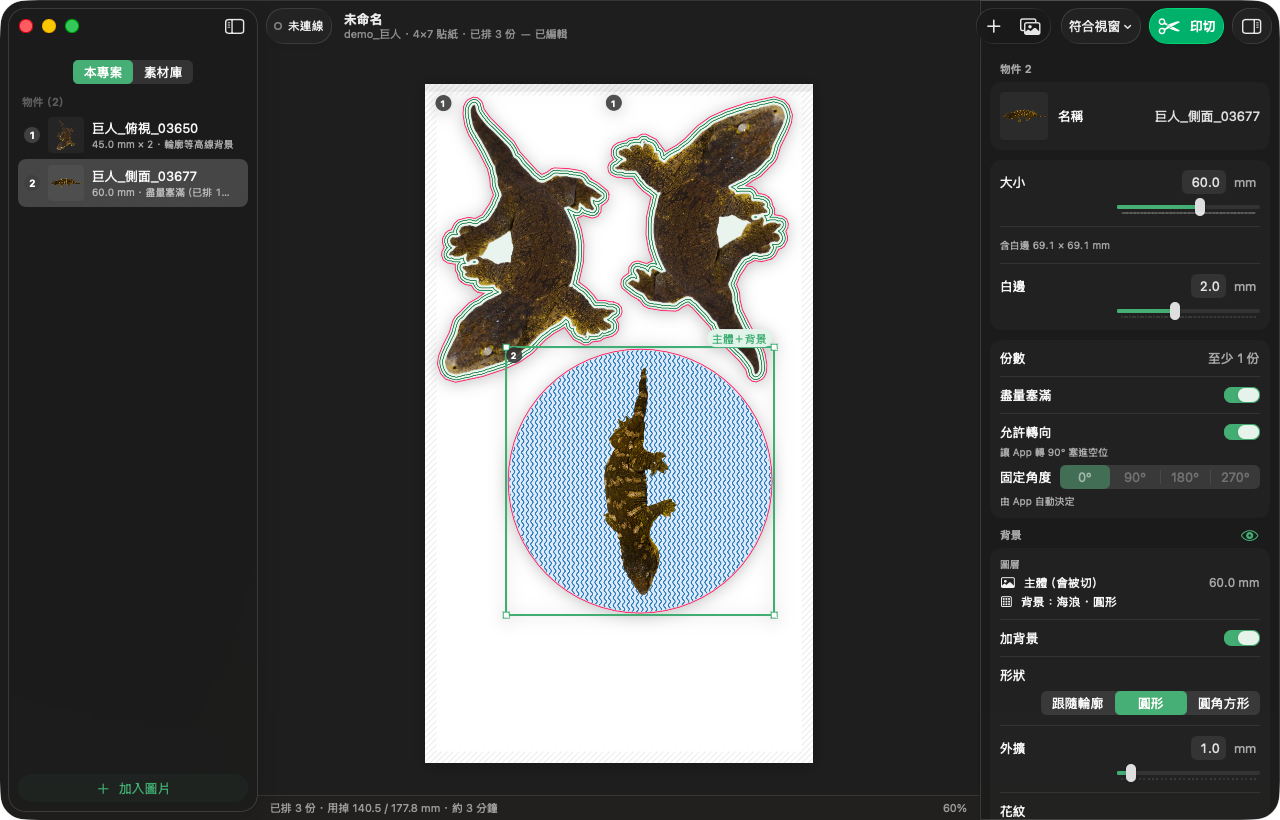
Screenshots show the Traditional Chinese interface.
More features
Auto layout that wastes no paper
Stickers keep a fixed gap. The app tries different orders and 0° / 90° / 180° / 270° rotations, then picks the arrangement that fits the most stickers in the shortest length of paper. Resize, change copies, or delete one, and the sheet re-arranges immediately. Automatic rotation can be switched on for the whole sheet to use the most space, or fixed per sticker when you want everything facing the same way.
Check before you print, because one wasted sheet is too many
Before every job you must confirm which paper is loaded. Cut lines, real sizes in mm, and blade pressure are all visible. If something fails, the job stops. It never reprints on its own.